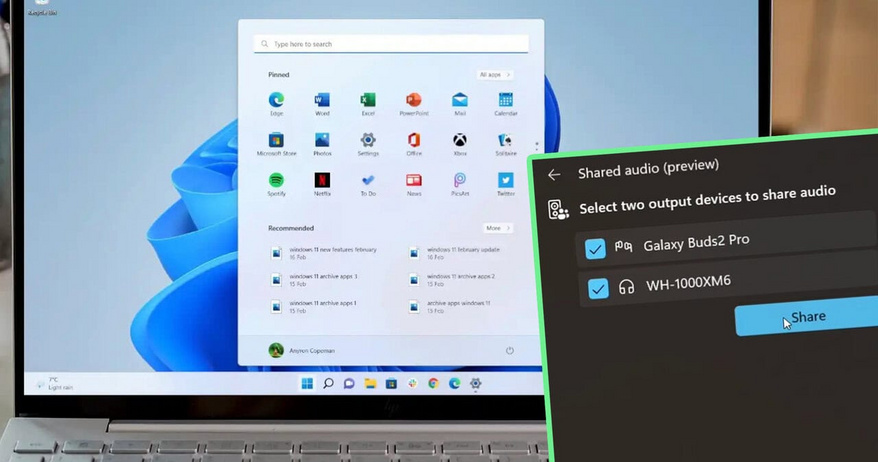
Microsoft recently rolled out an exciting feature in Windows 11—Shared Audio preview—that enables users to stream audio simultaneously to two wireless headphones, speakers, or hearing aids. This feature is developed based on Bluetooth LE Audio technology and is now available to Windows Insiders in the Dev and Beta testing channels.
The shared audio feature is designed to meet users' needs for enjoying movies or music together with friends or family on their laptops. Simply connect a Bluetooth LE-supported device to your Windows 11 computer, and then easily enable it by selecting the Shared audio (preview) button in the quick settings menu. Since August of this year, Microsoft has introduced LE Audio functionality in Windows 11, further enhancing the sound quality and performance of wireless headphones during calls and gaming.
With the promotion of shared audio technology, other tech companies have begun to join the fray. Google is using its Bluetooth LE-based Auracast feature to enable Android 16 devices to broadcast audio to compatible hearing aids, and they have also expanded this function to the Pixel 8 and newer models, supporting simultaneous connections to two pairs of headphones. Last year, Samsung pioneered the integration of Aurecast functionality into smartphones with the launch of the Galaxy S24.
Currently, the shared audio feature is limited to certain Copilot Plus PCs, including the 13.8-inch and 15-inch Surface Laptops and the 13-inch Surface Pro. Other models like the Samsung Galaxy Book5 360, Galaxy Book5 Pro, and 13-inch Surface Laptop will receive support at a later date. Additionally, users need to use Bluetooth LE compatible headphones, such as the Samsung Galaxy Buds 2 Pro, Buds 3, Buds 3 Pro, and the Sony WH-1000XM6 wireless headphones.